

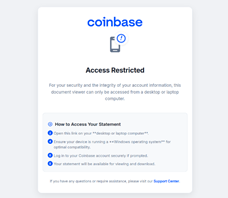
Kaspersky has uncovered a phishing scheme targeting users of Coinbase, a popular cryptocurrency exchange platform. The attackers tried to trick users into downloading software disguised as an account statement. As a result, users could lose funds or even access to their Coinbase account.
The attack began with an email prompting users to view their Coinbase account statement by following a link. The alleged statement is claimed to be accessible only on Windows-based desktops or laptops, urging users to open the downloaded file on these devices.
When the link was clicked on Windows and the file was downloaded and opened, remote access software got installed, which granted attackers control over the victim’s computer. The user was prompted to login to their Coinbase account, and the login and password were visible to the attackers: thus, the login credentials were compromised, and attackers could steal crypto or lock users out of their accounts.
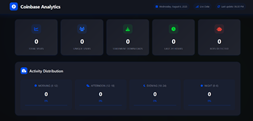
A view of the attackers’ dashboard which allows them to view different user metrics.
“This phishing campaign is a stark reminder of how cybercriminals exploit trusted platforms like Coinbase to deceive users. By masquerading their tool as a legitimate account statement, attackers are weaponising user trust. We urge everyone to verify links and files before opening them. Legitimate services would never ask a user to open links on their desktop or laptop computers running specifically Windows OS,” comments Olga Altukhova, Senior Web Content Analyst at Kaspersky.
To be protected from phishing, Kaspersky recommends:
- Verify unsolicited messages, calls, or links, even if they appear legitimate. Never share 2FA codes.
- Scrutinise videos for unnatural movements or overly generous offers, which may indicate deepfakes.
- Deny camera access requests from unverified sites and avoid uploading signatures to unknown platforms.
- Limit the sharing of sensitive details online, such as document photos or sensitive work information.
- Use trusted security solutions such as Kaspersky NEXT (in corporate environments) or Kaspersky Premium (for individual use) to block phishing attempts.